For rappers, singers and producers

The vocal plugin that listens to your beat.

Drop your beat in. VocalTrend fits your voice to it and makes room for you in the beat while you sing. Your vocal sits inside the beat, not on top of it, in seconds.

$40$20Launch price

Get VocalTrend — $20

The 2 a.m. mix

Does this sound familiar?

It's 2 a.m. The topline is recorded. The beat hits. You play it next to your favorite song, and your vocal sounds like a demo.

So you add an EQ. A compressor. Another preset. Now it's harsher, thinner, and somehow still sitting on top of the beat instead of inside it.

Not because you can't rap or sing. Because the beat you bought is a finished stereo file, and every plugin you own treats your voice like it's alone.

The real cost of mixing your vocal alone

The problemThe real impact
  • Your vocal sits on top of the beatIt sounds like karaoke over a YouTube instrumental.
  • The beat already fills the space where you singNo stems means nothing to carve out.
  • Presets made for someone else's voiceThey sound great in the demo and wrong on you.
  • Twelve plugins in the chainEvery fix creates two new problems.
  • Hours of tweakingThe song never leaves your hard drive.

Stop stacking plugins on a vocal that just needs to fit the beat.

Meet VocalTrend

Your whole vocal chain, fitted to your beat.

This is not another preset made for somebody else's voice.

This is not an AI that keeps changing your sound while you mix.

This is not a twelve-plugin chain you have to babysit.

This is one plugin that listens to your beat, fits your voice to it once, and leaves every decision visible and in your hands.

What you get

One plugin. Four things it does for you.

The Mix view when you want speed. Advanced when you want control.

01Only in VocalTrend

It listens to your beat

Drop the beat file in. That's the setup.

What does this solve?

Every other vocal plugin mixes your voice alone. VocalTrend reads your beat and works on both sides: it shapes your voice for that beat, and on the beat track it makes room for you while you sing.

  • Drag in the beat: WAV, AIFF, FLAC, OGG or MP3
  • On the beat track, the centre steps back while you sing and comes back in the gaps
  • The sides and the 808 stay untouched, so the beat keeps its weight and width
  • The two copies find each other in your DAW. No sidechain routing

ResultYour vocal sits inside the beat instead of floating on top.
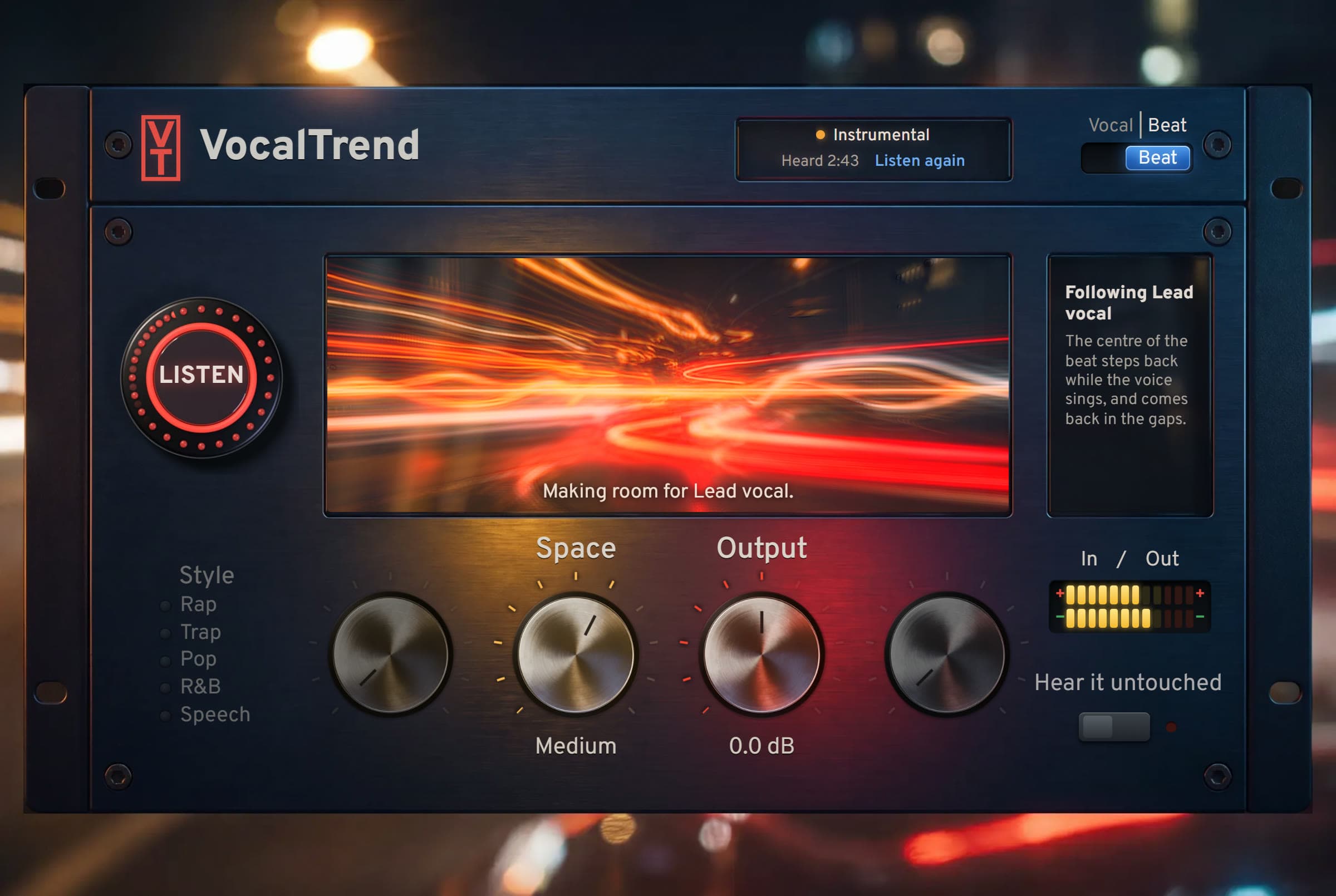
VocalTrend on the beat track: Listen button, Space and Output knobs, and the note “The centre of the beat steps back while the voice sings, and comes back in the gaps.”
02Learn once

Learn

Sing for 20 seconds. Then it stays put.

What does this solve?

Hit Learn and sing for 15 to 30 seconds. VocalTrend fits your voice to that beat once, then the settings stay fixed. No surprises while you mix.

  • Finds mud, harsh resonances, loud S's and a dull top end
  • Takes the beat into account, not just your voice
  • Nothing moves under you after Learn

ResultA sound fitted to your voice and your beat, not to a preset.

03Fast

Four knobs and a style

Plain words, no jargon.

What does this solve?

After Learn you get four knobs. Presence pulls you up front. Air adds the shine. Control keeps every word steady. Output sets the level.

  • Styles in one click: Rap, Trap, Pop, R&B, Speech
  • Hear the original at the same loudness, so better isn't just louder
  • Keep writing: record, Learn, keep going

ResultA finished vocal in seconds.

04Full control

Advanced view

Every module, every number.

What does this solve?

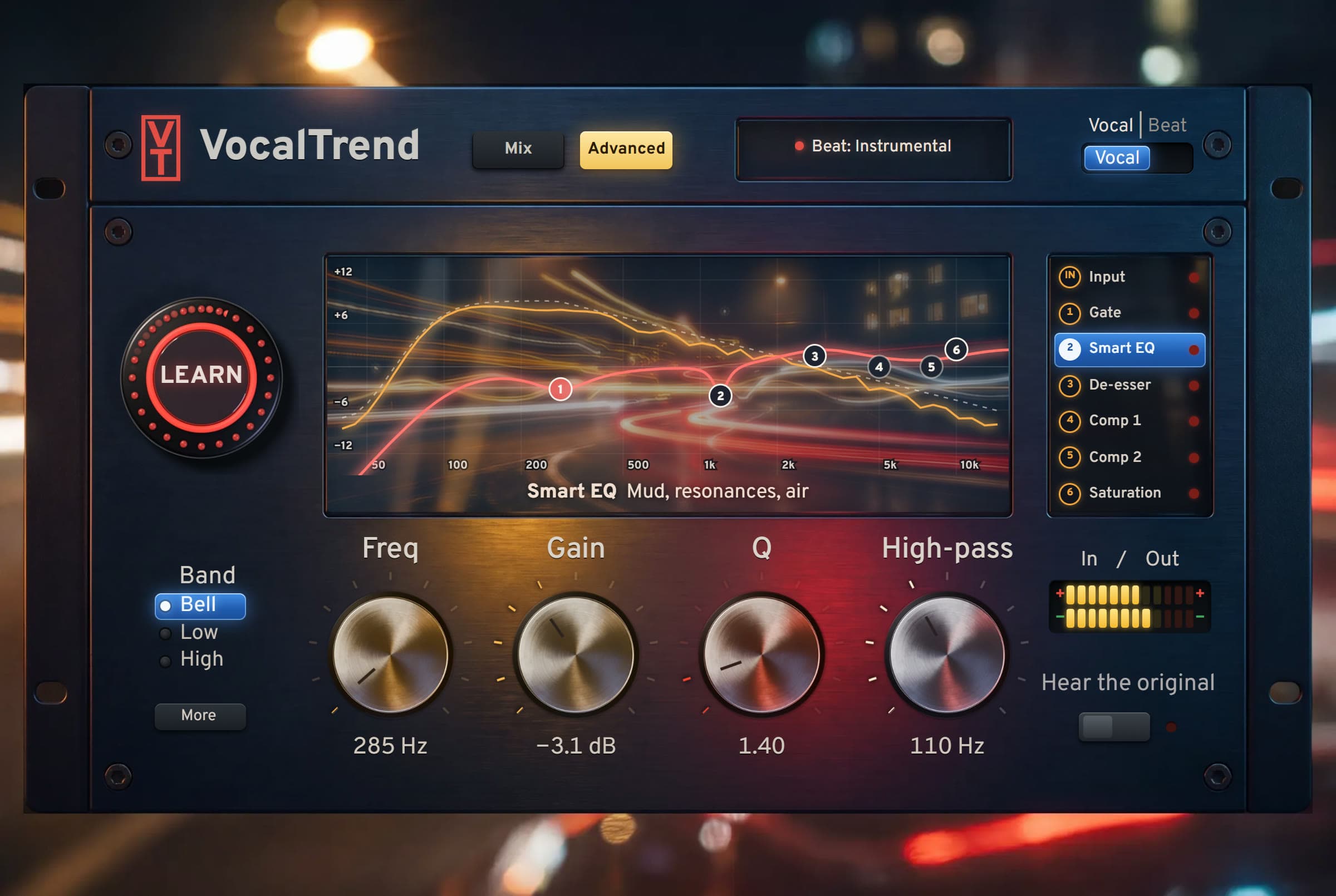
Open Advanced and the whole chain is there: input with vocal rider, gate, Smart EQ, de-esser, two compressors and saturation.

  • Smart EQ with six bands you can see and adjust
  • Two compressors with FET, Opto and VCA models
  • Bypass, amount and order for every module
  • Runs 100% on your computer. Settings saved in your project

ResultYou never lose control of your sound.

VocalTrend Advanced view: Smart EQ curve with six bands over the beat, and the signal path Input, Gate, Smart EQ, De-esser, Comp 1, Comp 2, Saturation

Included at no extra cost

The 3 mixing bonuses

So you know what every knob does, and why.

Bonus 1

Vocal Mixing Made Simple

PDF guide, 10–15 pages

Real value $47Free

What every module does, the right chain order, how to make a vocal sit in a beat, and the 10 most common mistakes. Each chapter points to the matching VocalTrend module.

  • EQ
  • Compression
  • De-essing
  • Saturation
  • Reverb and delay
  • Chain order
  • 10 common mistakes

Stop guessing. Know why each move works.

Bonus 2

The 1-Page Vocal Cheat Sheet

Printable PDF

Real value $27Free

Key vocal frequencies, chain order and starting values on one page you can keep next to your screen.

  • Frequency map
  • Chain order
  • Starting values

The answers, at a glance.

Bonus 3

Pre-Release Checklist

Printable PDF

Real value $17Free

Ten checks before you publish: levels, phone, car, headphones and export settings.

  • Levels
  • Phone test
  • Car test
  • Headphones
  • Export

Release with confidence.

Total value of the 3 bonuses

$91

Your price today

Free

Included with VocalTrend.

Launch price ends in

--
hours
--
min
--
sec

$20 instead of $40, plus an extra genre preset pack, free. When the timer hits zero, VocalTrend goes back to $40.

Your complete offer today

Everything you need for a vocal that sits in the beat

VocalTrend
  • VocalTrend plugin, lifetime license (VST3 + Standalone)
  • Beat link: room for your voice on the beat track
  • Learn, fitted to your voice and your beat
  • Mix view and full Advanced view
  • Styles: Rap, Trap, Pop, R&B, Speech
  • Free updates
  • Bonus: Vocal Mixing Made Simple guide
  • Bonus: 1-Page Vocal Cheat Sheet
  • Bonus: Pre-Release Checklist
  • 14-day money-back guarantee

Total value $131

VocalTrend alone $40

Your launch price today

$20

Pay once. Use forever. Instant download.

Get VocalTrend — $20

Lifetime license. Less than one artist preset.

  • Secure checkout by Stripe
  • Instant download
  • Money-back guarantee

14

day refund

14-day no-risk guarantee

Put VocalTrend on your own vocal, over your own beat, in your next session.

If it doesn't make your vocal sit better in the mix, email us within the guarantee period and we'll refund 100% of your money. No forms. No questions.

Everything you need to know

Frequently asked questions

Which DAWs does it work with?

VocalTrend is a VST3 plugin for Windows, so it runs in FL Studio, Ableton Live, Studio One, Reaper, Cubase and any DAW that loads VST3. It also comes as a standalone app. The Mac version (AU) is on the way.

Do I need the stems of the beat?

No. It works with the stereo beat you bought or downloaded. Just drop the file into the plugin.

Do I have to set up sidechain routing?

No. Put VocalTrend on your vocal and, if you want, a second one on the beat. They find each other inside your DAW, with nothing to route.

Is this an AI that changes my sound on its own?

No. Learn listens once and then the settings stay fixed. Every change is visible in Advanced, and you can edit or bypass any module.

Do my vocals get uploaded anywhere?

Never. Everything runs on your computer. No cloud, no account, no upload.

I'm a beginner. Will I know how to use it?

Yes. Drop the beat, hit Learn, sing. Then four knobs in plain English, and the included guide explains what every module does.

How do I get it after I pay?

You get the download link and your license right after checkout, by email and on the confirmation page.

What if it doesn't work for me?

You're covered by the money-back guarantee. Email us and we'll refund you in full.

Your next session

You can keep stacking plugins on your vocal and hoping it fits the beat…

Or drop one plugin on it and hear it sit in the mix.

  • No more vocals floating on top of the beat
  • No more twelve-plugin chains
  • No more presets made for someone else's voice
  • No more turning knobs you don't understand
  • No more songs stuck on your hard drive

VocalTrend doesn't make you an artist. You already are.

It puts your vocal in the beat.

Everything included

  • VocalTrend plugin, lifetime license (VST3 + Standalone)
  • Beat link: room for your voice on the beat track
  • Learn, fitted to your voice and your beat
  • Mix view and full Advanced view
  • Styles: Rap, Trap, Pop, R&B, Speech
  • Free updates
  • Bonus: Vocal Mixing Made Simple guide
  • Bonus: 1-Page Vocal Cheat Sheet
  • Bonus: Pre-Release Checklist
Get VocalTrend — $20
  • 14-day money-back guarantee
  • Instant download
  • Pay once, use forever